Blog

Luis Majano

July 08, 2016

Spread the word


Share your thoughts


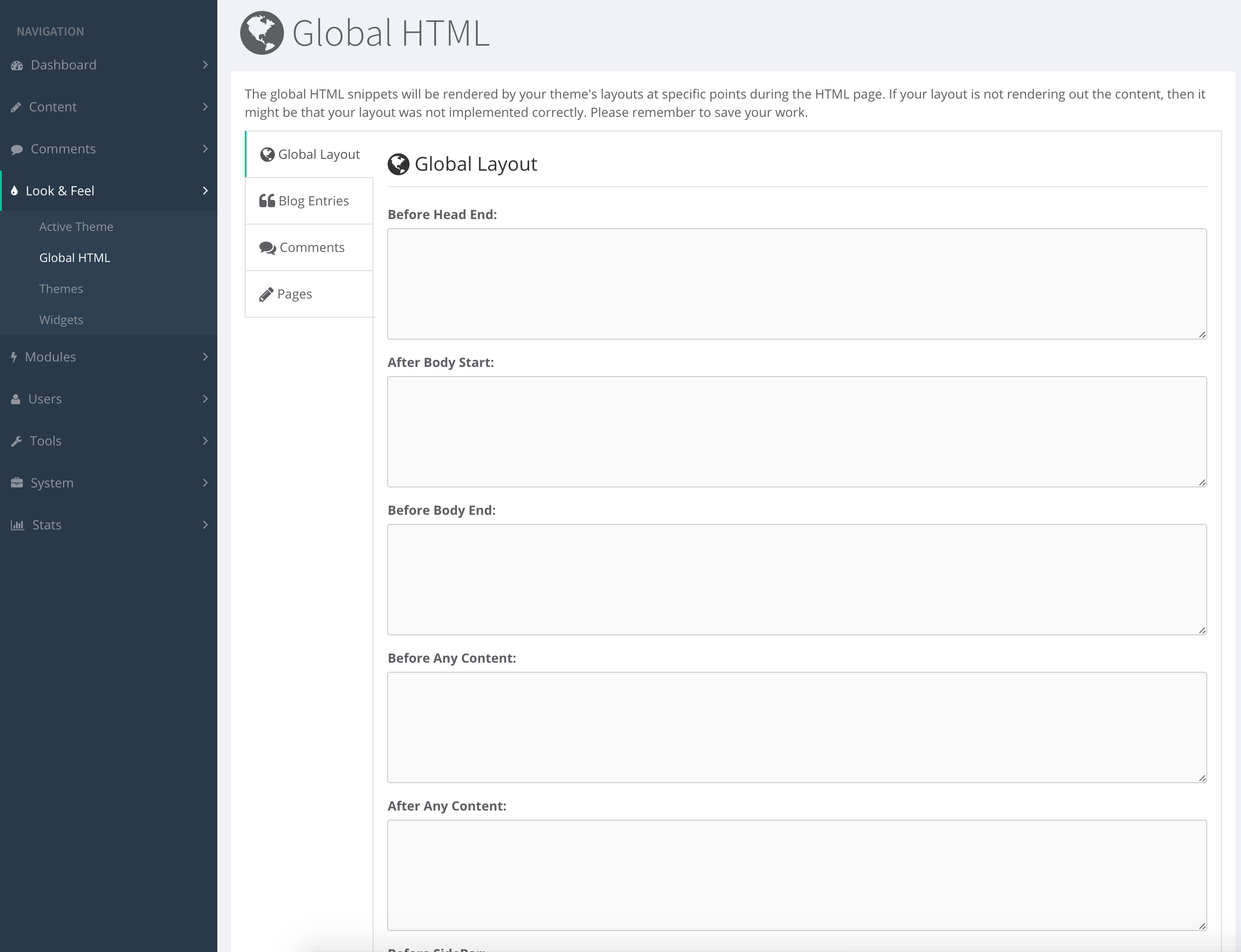
ContentBox has what we call, a Global HTML manager. This manager allows you to seamlessly drop in JavaScript/CSS/HTML to specific theme and UI presentation life-cycle events.

Please note that the active theme must implement the life-cycle events in order for the Global HTML output to happen.

Purpose

The purpose of the Global HTML manager is to allow the integration of third-party scripts, CSS or HTML integrations easily without altering code or programming it in the theme. This allows for cross-theme output in a manageable manager.

Event Sections

The following are the sections where you can intercept and put data for output:

  • Global Layout
  • Blog Entries
  • Comments
  • Pages

You can add custom markup for any of the interception points show in this section, from after any content, before any comment, after any blog entry, etc.

Theme implementation

Implementing these events are super easy. All you have to do is announce the event using the ContentBox helper class's method: event() anywhere you want the content to output. Here is an example:


    #cb.event( "cbui_beforeHeadEnd" )#

The many events you can announce are:


"cbui_beforeHeadEnd",
"cbui_afterBodyStart",
"cbui_beforeBodyEnd",
"cbui_footer",
"cbui_beforeContent",
"cbui_afterContent",
"cbui_beforeSideBar",
"cbui_afterSideBar",
"cbui_preEntryDisplay",
"cbui_postEntryDisplay",
"cbui_preIndexDisplay",
"cbui_postIndexDisplay",
"cbui_preCommentForm",
"cbui_postCommentForm",
"cbui_prePageDisplay",
"cbui_postPageDisplay",
"cbui_preArchivesDisplay",
"cbui_postArchivesDisplay"

Summary

Hopefully now you can see how easy it is to output custom HTML, JavaScript, CSS or whatever you like in specific execution points of your theme. This allows you to easily integrate with things like social sharing, Google Analytics and much more.
Add Your Comment

(1)

Aug 10, 2016 09:26:32 UTC

by Dan OKeefe

What would be the approach to implement a theme based on bootstrap such as <a href=https://wrapbootstrap.com/theme/ace-responsive-admin-template-WB0B30DGR?">https://wrapbootstrap.com/theme/ace-responsive-admin-template-WB0B30DGR?</a> Would I use globalHTML like I would a layout? Or are layouts still respected? I am wondering if I have to pick a theme at all and still use contentbox to manage the site (module).

Recent Entries

πŸš€ ColdBox CLI 8.11: The Era of AI Skills Comes to Every ColdBox & BoxLang App

πŸš€ ColdBox CLI 8.11: The Era of AI Skills Comes to Every ColdBox & BoxLang App

ColdBox CLI 8.11 is here, and it's one of the most significant releases we've shipped for AI-assisted development. This release wires the CLI directly into our brand new public skills directory at skills.boxlang.io, brings our AI tooling in line with industry-wide agent conventions, and introduces a wave of quality-of-life improvements that make AI integration feel less like setup and more like infrastructure.

Luis Majano
Luis Majano
April 30, 2026
πŸ›°οΈ Introducing cbMCP β€” Your ColdBox App, Live to Every AI Agent

πŸ›°οΈ Introducing cbMCP β€” Your ColdBox App, Live to Every AI Agent

Today we're releasing cbMCP, the official ColdBox MCP Server β€” a BoxLang-only module that turns your running ColdBox application into a fully-compliant Model Context Protocol (MCP) server. Plug in any MCP-capable AI client β€” Claude Desktop, VS Code Copilot, Cursor, Codex, Gemini CLI, OpenCode β€” and your AI assistant gets live, read-only introspection across the entire ColdBox platform: routing, handlers, modules, WireBox, CacheBox, LogBox, schedulers, interceptors, and async executors. 🎯

Luis Majano
Luis Majano
April 30, 2026